Client-Side vs Server-Side Authorization: Why You Need Both
Client-side vs server-side authorization in React and Next.js: enforce permissions on the server, use client checks for UX, and avoid 403 drift.

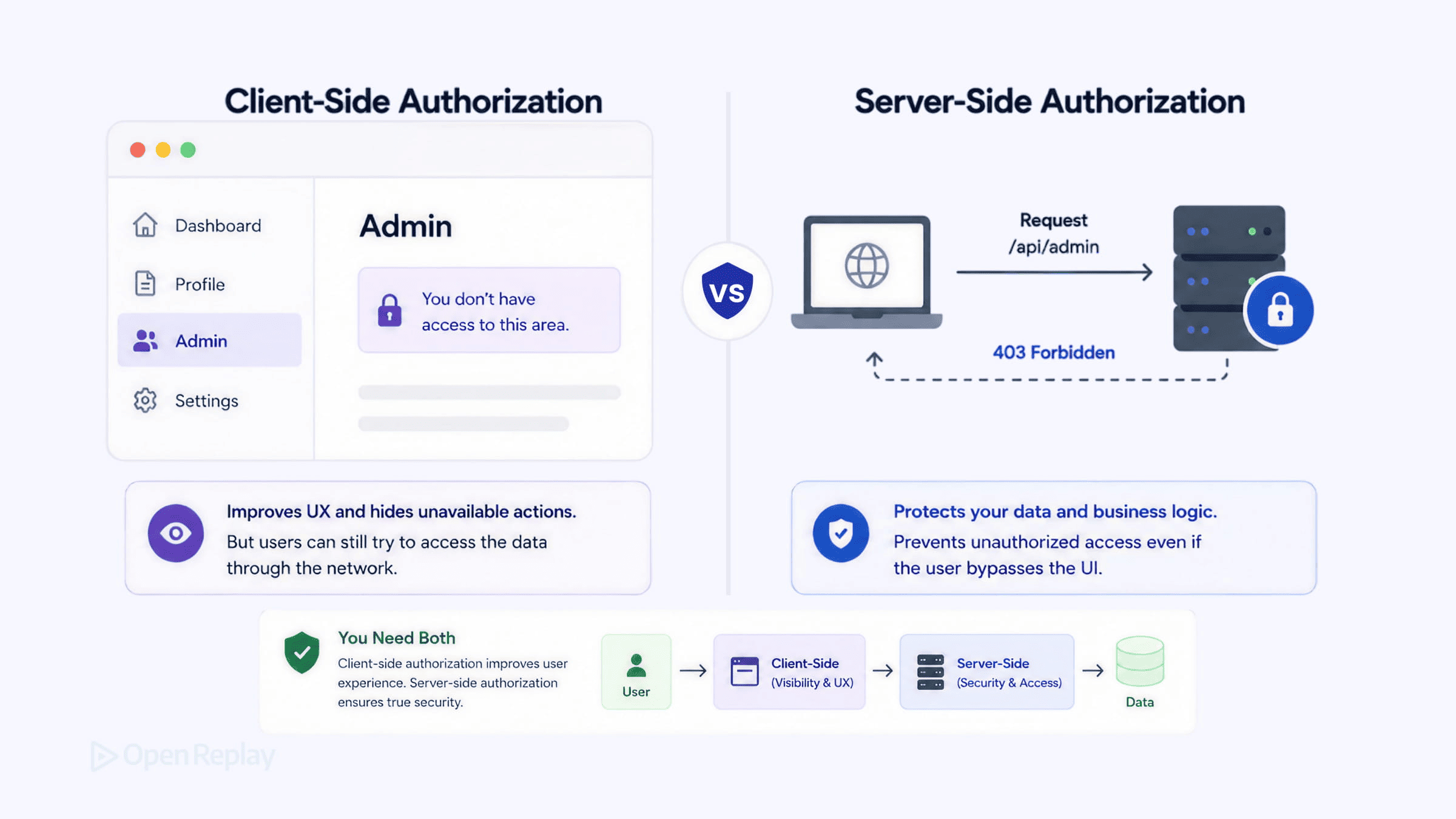
Client-side authorization is the access logic that runs in the browser and shapes what users see; server-side authorization is the access logic that runs on the server and decides what actually happens — and no amount of UI gating changes what the server will accept. These are two different jobs at two different trust boundaries, and skipping either one produces a specific, predictable failure: client-only checks are bypassable by anyone who opens DevTools, and server-only checks leave users clicking buttons that return 403s with no idea why.
If you’ve shipped a React or Next.js app where role checks live in if (user.role === 'admin') blocks, you’ve already written client-side authorization — you may just be unsure where the actual security boundary sits. This article draws that boundary precisely: why the client is untrusted, why the server is the only gatekeeper that matters, what client-side checks are legitimately for, and how to keep both layers in sync using a single permission identifier enforced on both sides.
Key Takeaways
- The client is an untrusted environment: any user can open DevTools, mutate the variable holding their role, and watch your conditional renders respond — so authorization decisions must be enforced server-side, at a gateway, or in a serverless function (OWASP Authorization Cheat Sheet).
- Client-side authorization exists for UX, not security: it hides buttons, gates routes, and renders only the menu items that apply, so users never land on a dead end.
- The frontend’s permission state is a cache of what the server will allow; when the two drift, you get either a phishable workflow (UI shows a button the server 403s) or a hidden capability (server allows an action the UI never surfaces).
- Use permission identifiers like
tasks:deleteat both layers, not role-name comparisons likerole === 'admin'— permission names survive role restructuring and match the unit the server actually enforces. - A 401 means unauthenticated and should redirect to login; a 403 means authenticated but not authorized and should surface a permission-denied state (RFC 9110 §15.5.2, §15.5.4).
The client is an untrusted environment
Every role check in your JavaScript runs in an environment the user controls: they can open DevTools, find the variable holding their role, set it to 'admin', and watch your conditional renders respond — the server’s response to their next request is the only thing that doesn’t change. This is the foundational fact that makes client-side authorization insufficient on its own. The browser executes your code, but the user owns the browser, and they can rewrite anything between page load and the next network request.
The OWASP Authorization Cheat Sheet states the practical rule directly: client-side access-control checks may improve UX, but authorization decisions must be enforced server-side, at a gateway, or in a serverless function — because client-side logic is easy to bypass. The conceptual framing predates modern SPAs entirely; the Static Apps guide on authentication put it as “the end user can execute arbitrary code on the client-side without prior permission.”
A 30-second DevTools bypass
The cleanest demonstration of why client-only authorization fails is to bypass it yourself. This is reproducible in any browser with DevTools, against any React app that stores role in component state rather than deriving it on each request from a server-verified token:
- Log in as a regular (non-admin) user. The admin panel is hidden — your component renders
{user.role === 'admin' && <AdminPanel />}anduser.roleis'user'. - Open DevTools and locate the component state holding
user. With React DevTools you can inspect and edit hook state directly; without it, any code path that exposes the user object to a mutable reference works. - Set
roleto'admin'. React re-renders. The admin panel appears in the DOM. - Click the delete button the panel exposes. The request fires.
- If the server enforces authorization, it reads the identity from your token — not from your mutated client state — and returns
403 Forbidden. Nothing happened to the data.
The attack succeeds at step 3 (the UI changes) and fails at step 5 (the server rejects the request) only if there is a server check. With no server check, step 4 mutates real data. The bypass works specifically because role lives in mutable client state; it does not work when the server re-derives authorization from a verified token on every request.
The server is the only gatekeeper that matters

Discover how at OpenReplay.com.
Authorization decisions that change data or expose protected resources must be made and enforced on the server, because the server is the only participant in the request the user cannot rewrite. The backend is the ultimate gatekeeper: regardless of what the frontend renders, hides, or disables, the server’s evaluation of the request is the decision of record. Frontend controls are not a substitute for backend enforcement.
Here is server-side enforcement of a single permission, tasks:delete, as a Next.js Route Handler. The permission is read from the authenticated session, not from anything the client sends in the body:
// app/api/tasks/[id]/route.ts — Next.js App Router
import { NextRequest, NextResponse } from 'next/server';
import { getSessionPermissions } from '@/lib/auth';
import { deleteTask } from '@/lib/tasks';

export async function DELETE(
  req: NextRequest,
  { params }: { params: { id: string } },
) {
  const permissions = await getSessionPermissions(req); // derived from a verified token/session

  if (!permissions.includes('tasks:delete')) {
    return NextResponse.json(
      { error: 'forbidden', permission: 'tasks:delete' },
      { status: 403 },
    );
  }

  await deleteTask(params.id);
  return new NextResponse(null, { status: 204 });
}
The 403 carries the specific permission name in the body. That detail matters later: it lets the client distinguish a permission denial from any other failure and render a coherent message instead of a generic toast. The 403 Forbidden status is the correct semantic choice per RFC 9110 §15.5.4, which defines it as the server understanding the request but refusing to authorize it.
Client-side authorization is for the interface, not the gate
Client-side authorization exists to shape the interface: hide admin buttons from non-admins, gate routes so users don’t land on a 403, and show only the menu items that apply. It improves the experience by guiding users toward actions they can actually complete — it does not, and cannot, secure anything. Think of the frontend as the display case, not the vault: it arranges what’s reachable and on offer, while the lock stays on the server.
The standard implementation reads permissions from context and renders conditionally on a permission identifier:
// components/TaskActions.tsx
'use client';
import { usePermissions } from '@/hooks/usePermissions';

export function TaskActions({ taskId }: { taskId: string }) {
  const { can } = usePermissions();

  return (
    <div className="task-actions">
      {can('tasks:delete') && (
        <button onClick={() => deleteTask(taskId)}>Delete</button>
      )}
    </div>
  );
}
Note the identifier: tasks:delete, not role === 'admin'. Checking user.role === 'admin' couples your UI to your role taxonomy; checking can('tasks:delete') couples it to the action the server actually enforces — and the server doesn’t care what role granted it. When you later split admin into admin and billing-admin, permission-named checks survive untouched. The OWASP Authorization Cheat Sheet recommends separating roles from permissions for exactly this reason. RBAC remains a common access-control model for frontend applications; for the full RBAC/ABAC/ACL/PBAC selection question, LogRocket’s access control model comparison covers it well.
One craft note: session replays of role-gated UIs frequently surface the brief moment when an unauthorized user sees the admin button before a client-fetched permission check resolves and hides it — a flash of unauthorized UI caused by permission state arriving after the first paint. The fix is to server-render the permission state or pre-load it before render, which the next section’s handoff pattern does by design.
The two layers must agree: permission drift
The frontend’s view of permissions is a cache of what the server will allow, and the two must stay in sync. When the frontend’s permission state diverges from the server’s enforcement rules, you get one of two failures: a button the server will 403 (a phishable workflow), or an action the server allows that the UI never surfaces (a hidden capability). The first is a security and UX problem — you’re showing affordances that don’t work, and an attacker can study which ones the server actually honors. The second is a pure capability loss — users can’t reach something they’re entitled to.
The way to prevent drift is structural: define one source of truth and feed both layers from it.
The handoff pattern
The handoff pattern is an authorization architecture in which the server holds the single source of truth for permissions and the client holds a cache of that truth — populated at login, used to render the interface, but advisory rather than authoritative. The complete circuit runs: the server decides the user’s permissions, sends them to the client in a known wire format, the client caches them in context, the UI renders against the cache, the user acts, and the server re-verifies on the request. The same permission identifier appears at every step.
Start with the wire format. At login (or in the initial Server Component render), the server emits the permission set:
{
  "userId": "u_8123",
  "permissions": ["tasks:read", "tasks:create", "tasks:delete"]
}
If you carry permissions in a JWT, they live as claims in the token payload. A signed JWT (a JWS) carries claims in a base64url-encoded payload that is integrity-protected, not encrypted — the signature proves the claims weren’t tampered with, but the claims are not secret and are readable by the client. Encrypted JWTs (JWEs) are a different construction. This distinction comes from RFC 7519, the JWT specification. The practical consequence: a JWT’s permission claims are a perfectly good cache for rendering, but they’re still only a cache. The server should validate authorization on each request using whatever source of truth your architecture relies on.
Feed the cache into context once, ideally from a Server Component so the data is present at first paint:
// app/layout.tsx — Server Component, Next.js App Router
import { getSessionPermissions } from '@/lib/auth';
import { PermissionsProvider } from '@/hooks/usePermissions';

export default async function RootLayout({
  children,
}: {
  children: React.ReactNode;
}) {
  const permissions = await getSessionPermissions(); // same source the API uses

  return (
    <html lang="en">
      <body>
        <PermissionsProvider permissions={permissions}>
          {children}
        </PermissionsProvider>
      </body>
    </html>
  );
}
// hooks/usePermissions.tsx
'use client';
import { createContext, useContext } from 'react';
const PermissionsContext = createContext<string[]>([]);
export function PermissionsProvider({
permissions,
children,
}: {
permissions: string[];
children: React.ReactNode;
}) {
return (
<PermissionsContext.Provider value={permissions}>
{children}
</PermissionsContext.Provider>
);
}
export function usePermissions() {
const permissions = useContext(PermissionsContext);
return { can: (p: string) => permissions.includes(p) };
}Because getSessionPermissions() is the same function the Route Handler calls, the UI and the gate read identical data, and tasks:delete means the same thing on both sides. Loading permissions in a Server Component (rather than fetching them in a client useEffect) means the permission set is available before the first paint — no flash of the wrong UI, no flicker while a check resolves.
React Server Components and Server Actions: the boundary is syntactic
In the Next.js App Router, the words “client” and “server” describe where code runs, not a network call you make by hand — and that distinction is what makes Server Actions a legitimate place to enforce authorization. A Next.js Server Action that calls a permission check before mutating data is server-side authorization, regardless of where it sits in the component tree: the code runs on the server, the user cannot modify it, and the check cannot be bypassed by editing client state.
In current Next.js App Router documentation, the 'use server' directive marks a Server Function; a Server Function used in an action/mutation context is also called a Server Action. The directive is the boundary marker — code under it executes on the server even though it’s authored in a .tsx file alongside client components:
// app/tasks/actions.ts — Next.js App Router
'use server';

import { getSessionPermissions } from '@/lib/auth';
import { deleteTask } from '@/lib/tasks';

export async function deleteTaskAction(taskId: string) {
  const permissions = await getSessionPermissions(); // runs on the server

  if (!permissions.includes('tasks:delete')) {
    return { ok: false as const, error: 'forbidden', permission: 'tasks:delete' };
  }

  await deleteTask(taskId);
  return { ok: true as const };
}
This is the same tasks:delete check as the Route Handler, in the same enforcement position. Editing client state to fake role === 'admin' does nothing here — the action re-derives permissions from the session on the server. Server Actions don’t remove the need for the gate; they’re another place the gate lives. See the Next.js use server directive documentation for the directive’s full semantics.
When your SPA calls a third-party API directly
When your SPA calls a third-party API directly from the browser, the third party is your server for authorization purposes — a payments provider, a headless CMS, or a backend-as-a-service is the gate, whether or not you wrote it. The enforcement boundary doesn’t disappear because you didn’t write the backend; it moves to whoever evaluates the request. Your client-side checks are still UX-only, and the third party’s authorization rules are the gate. If you can’t enforce a decision in code you control, route the request through your own backend so you can.
Failure modes: what breaks when you skip a layer
Skipping either layer produces a distinct, predictable failure. Client-only authorization is trivially bypassable; server-only authorization leaves users confused. Neither is acceptable on its own.
| Layer skipped | What breaks | Who exploits it | User experience |
|---|---|---|---|
| Server-side (client-only) | Authorization isn’t enforced at all | Any user with DevTools or curl | Looks fine — until data is altered by someone who shouldn’t |
| Client-side (server-only) | UI shows actions the server will reject | No exploit; it’s a UX defect | Users click a button, get a 403, click again, give up |
The rule is short enough to remember: render with client permissions, enforce with server permissions, and ship the same permission identifiers to both. Violate the first and users click buttons that return 403s. Violate the second and any user with DevTools can promote themselves.
The UX of authorization failure: 403 vs 401
When the server rejects an action the UI thought was allowed, the response status tells you exactly what to show the user. A 401 means the user isn’t authenticated — redirect to login. A 403 means they’re authenticated but not authorized — show a permission-denied state, not a generic error, so the user understands why the action failed. These semantics are fixed by RFC 9110: §15.5.2 defines 401 Unauthorized (authentication is required and has failed or not been provided), and §15.5.4 defines 403 Forbidden (the server understood the request but refuses to authorize it).
async function deleteTask(taskId: string) {
  const res = await fetch(`/api/tasks/${taskId}`, { method: 'DELETE' });

  if (res.status === 401) {
    window.location.assign('/login');
    return;
  }
  if (res.status === 403) {
    const body = await res.json();
    showPermissionDenied(body.permission); // e.g. "You don't have permission to delete tasks."
    return;
  }
  if (!res.ok) {
    showError('Something went wrong. Try again.');
    return;
  }
  // success
}
Treating 403 distinctly is where client/server drift becomes visible to the user. Session replays of 403 responses commonly show a user clicking a button, getting a generic error toast, then clicking again — a sign the UI never communicated that the action was denied for permission reasons specifically. Surfacing the permission name from the response body (the permission: 'tasks:delete' field the server sent) closes that gap. The RFC defines what 403 means; how you present it is your call, but the meaning is the thing the UI should reflect.
Conclusion
Authorization lives at two boundaries doing two jobs: the client shapes the interface, the server decides what happens, and the same permission identifiers flow to both from a single source of truth on the server. Audit your own code for the two failure modes — search for role or permission checks that gate data mutations with no matching server-side enforcement (a bypass waiting to happen), and search for client-side checks that have drifted from what your API returns (a 403 your users can’t make sense of). Wherever a check changes data, confirm the server re-derives the decision from a verified session, not from anything the client can rewrite.
FAQs
Is it safe to store user permissions in a JWT if the client can read them?
Yes, as long as you treat the token as a cache and not a security boundary. A signed JWT (a JWS) carries claims in a base64url-encoded payload that is integrity-protected but not encrypted, so the client can read the permissions, but the signature prevents tampering. The risk is not exposure of the permission list; it is trusting it. The server should validate authorization on every request according to the authorization model used by the application.
Does a Next.js Server Action need its own authorization check if the page already gated the UI?
Yes. UI gating only controls what renders; it does not protect the mutation. A Server Action runs on the server and can be invoked independently of the page that rendered it, so it must re-derive permissions from the verified session and reject unauthorized calls itself. The 'use server' directive marks where code runs, not whether it is authorized. Treat every Server Action as an enforcement point, exactly like a Route Handler.
What status code should an API return when a user is logged in but lacks permission for an action?
Return 403 Forbidden, not 401 Unauthorized. RFC 9110 defines 401 as authentication being required and having failed or not been provided, and 403 as the server understanding the request but refusing to authorize it. A logged-in user without permission is authenticated but not authorized, which is precisely 403. The client should redirect to login on 401 and show a permission-denied state on 403, so the two failures stay visually and behaviorally distinct.
Why check 'tasks:delete' instead of 'role === admin' on the frontend?
Permission identifiers survive role restructuring; role-name comparisons do not. Checking 'role === admin' couples the UI to your current role taxonomy, so splitting admin into admin and billing-admin later breaks every check. Checking 'tasks:delete' couples the UI to the action the server actually enforces, which does not change when roles are reorganized.