Removing Native Element Styling with CSS all: unset
Use all: unset to strip native element styling in CSS, reset buttons and form controls, and restore focus-visible accessiblity.

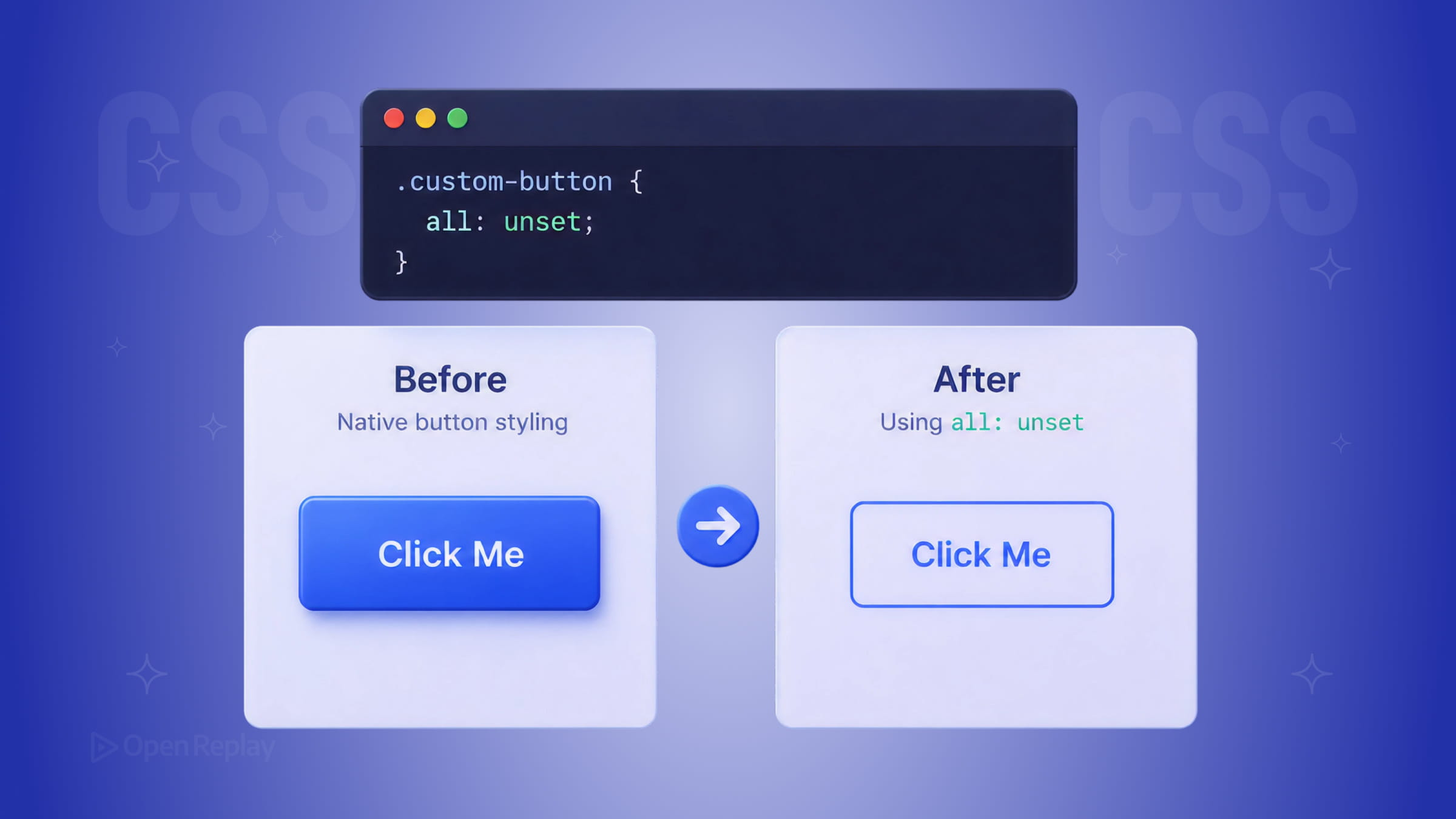
You’ve been there: you want a custom-styled button, so you start overriding browser defaults one property at a time. border: none. background: none. padding: 0. cursor: pointer. It works, but it feels wrong — like you’re playing whack-a-mole with the user agent stylesheet.
There’s a cleaner approach: the CSS all property. Specifically, all: unset. This article explains exactly what it does, when to use it, and what it silently breaks — including focus styles that keyboard users depend on.
Key Takeaways
all: unsetresets every CSS property at once: inherited properties inherit from the parent, while non-inherited properties revert to their CSS specification’s initial value (not the browser default).- It strips focus rings, so always restore visibility with
:focus-visibleto protect keyboard accessibility. all: unsetandappearance: nonesolve different problems. Form controls often need both: one for the cascade, one for OS-level rendering.- Avoid using it on layout containers or when only a few properties need changing — it’s a blunt tool best reserved for full component resets.
What all: unset Actually Does in the CSS Cascade
The all property is a shorthand that sets every CSS property at once, except for unicode-bidi, direction, and CSS custom properties. According to MDN, all: unset applies the following rule to each property:
- If the property is inherited (like
color,font-size,line-height), it inherits from its parent. - If the property is not inherited (like
display,border,background,padding), it reverts to the CSS specification’s initial value.
That’s a critical distinction. all: unset does not restore browser defaults. It resets non-inherited properties to their specification defaults — which are not the same thing. A <button> styled with all: unset won’t look like a plain browser button. It will lose its display, appearance, border, padding, and focus ring entirely.
The Four Values of the all Property
| Value | What it does |
|---|---|
unset | Inherited properties inherit; non-inherited properties revert to their initial value |
initial | Every property resets to its CSS spec default (ignores inheritance) |
revert | Rolls properties back to the value they would have had without the current author stylesheet, often restoring browser defaults |
inherit | Forces every property to inherit from the parent |
For custom UI components, all: unset is usually what you want. If you need to undo your own stylesheet overrides while keeping browser defaults intact, all: revert is the better choice.
Resetting a Button the Right Way
Here’s a practical button reset pattern that strips native element styling without breaking accessibility:
.button-reset {
  all: unset;

  /* Restore safe defaults */
  display: inline-block;
  cursor: pointer;
  box-sizing: border-box;

  /* Your custom styles */
  padding: 0.5rem 1rem;
  background: #0070f3;
  color: white;
  border-radius: 4px;
}

/* Always restore focus visibility for keyboard users */
.button-reset:focus-visible {
  outline: 2px solid #0070f3;
  outline-offset: 3px;
}
The :focus-visible rule is non-negotiable. all: unset removes the browser’s default focus ring, which means keyboard users lose their only visual indicator of where focus is. Restoring it with :focus-visible follows browser heuristics for when a visible focus indicator should be shown, commonly during keyboard navigation, without always showing the outline on mouse clicks.
Discover how at OpenReplay.com.
all: unset vs. appearance: none — These Are Not the Same
This is a common source of confusion. appearance: none only removes the native OS-level rendering of form controls — the platform-specific chrome that makes a <select> look like a macOS dropdown or a Windows combo box. It does not touch layout, spacing, color, or any other CSS property.
all: unset is a broad CSS cascade reset. It affects everything (with the small exceptions noted above).
For native form controls like <select>, <input>, and <textarea>, you often need both:
select {
  all: unset;
  appearance: none; /* Removes OS-level control rendering */
  display: block;
  width: 100%;
  padding: 0.5rem;
  border: 1px solid #ccc;
  border-radius: 4px;
  background: white;
  cursor: pointer;
}

select:focus-visible {
  outline: 2px solid #0070f3;
  outline-offset: 2px;
}
Note that some browsers also require the -webkit-appearance: none prefix for full cross-browser support on older versions of Safari and iOS. Browser support for both all and appearance is strong across modern browsers.
When Not to Use all: unset
Avoid all: unset on elements where you only need to change a few properties. It’s a blunt instrument. If you just want to remove a button’s background and border, target those properties directly — it’s less likely to produce unexpected side effects.
Also avoid it on container elements. Resetting display on a flex or grid parent will collapse your layout silently.
Conclusion
all: unset is a powerful shortcut for stripping native element styling from buttons, links, and form controls — but it resets everything, including properties you probably want to keep. Always restore display, box-sizing, cursor, and especially :focus-visible after using it. Pair it with appearance: none when working with native form controls that have OS-level rendering. Used carefully, it’s one of the cleanest tools in modern CSS for building custom UI components from scratch.
FAQs
Does all: unset reset CSS custom properties (variables)?
No. The all property does not affect CSS custom properties, direction, or unicode-bidi. Your --color-primary or other custom variables will pass through untouched, which is useful when building themed components that inherit design tokens from a parent scope.
Why does my button still look weird after applying all: unset?
Because all: unset resets properties to their CSS specification defaults, not browser defaults. The button loses its inline-block display, padding, border, and cursor. You need to manually restore these properties after the reset, including display, cursor, box-sizing, and a focus-visible outline for keyboard users.
Should I use all: unset or all: revert for component resets?
Use all: unset when building a custom component from scratch with no browser styling. Use all: revert when you want to undo your own stylesheet rules while keeping the browser's user agent defaults intact. For most custom buttons and form controls, unset is the better choice.
Is all: unset safe to use in production today?
Yes. The all property has strong support across all modern browsers, including Chrome, Firefox, Safari, and Edge. It has been stable for years. The main risk is not browser compatibility but accidentally resetting properties you wanted to keep, especially focus styles and layout-critical display values.
Truly understand users experience
See every user interaction, feel every frustration and track all hesitations with OpenReplay — the open-source digital experience platform. It can be self-hosted in minutes, giving you complete control over your customer data.
Star on GitHub12k